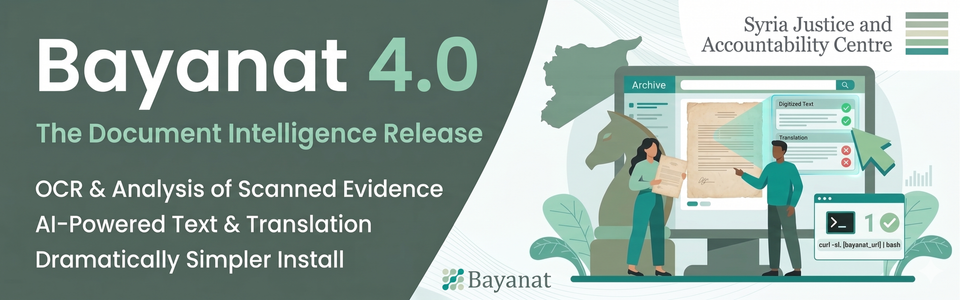
Bayanat 4 is here
The Syria Justice and Accountability Centre is pleased to announce the release of Bayanat 4.0, the largest update in the platform's history — six months and 76 merged pull requests since v3.
Bayanat is the open-source evidence platform for human rights accountability. Human rights organizations use it to document violations, manage media and testimony, connect actors and incidents, and build the case files that support prosecution and advocacy work. Version 4 focuses on two things: helping the platform make sense of the documents inside it, and making Bayanat dramatically easier to install, run, and upgrade.
For the people doing the work, the archive can finally help you read the documents, not just file them. For the IT teams supporting them, standing up or upgrading a Bayanat instance is no longer a multi-day project.
Document intelligence
Until now, if a piece of evidence lived inside a scanned PDF or a photograph of a paper document, Bayanat could store it but could not help you find anything inside it. Version 3 shipped a basic Tesseract helper that tried to extract text from PDFs during import, but the results were not first-class data — not editable, not translatable, not searchable across the archive.
Version 4 replaces that with a complete document intelligence pipeline:
- Extract text from scanned PDFs, photographs, and Word documents. Results are stored as first-class data alongside the original file.
- Correct it. Editors with the right permissions can fix OCR mistakes inline, and every change is tracked in history.
- Translate it. Any extracted text can be translated on demand — through Google Translate when using Google Vision, or through the same LLM endpoint when using a model backend.
- Search inside it. Find every mention of a name, place, or phrase across the entire archive, even in documents that were never typed.
- See exactly what was found, where. When using Google Vision, an opt-in overlay draws a box around every word the system detected, right on top of the original page, so you can verify accuracy at a glance.
The philosophy is straightforward: AI handles scale, humans handle judgment. The OCR engine extracts what teams could never read through by hand. Editors verify and correct what the model got wrong. Every correction is recorded in history, so the audit trail stays intact and the work remains attributable. AI assists. It does not replace.
This matters most for archives where the evidence arrives as paper, scans, or photographs of documents. Until now, that material was effectively a closed box for full-text search.
Bring your own AI
This is where being open source matters. Most platforms that promise AI document processing lock you into a single cloud vendor. Bayanat 4 does not.
The OCR engine works with any AI model that speaks the standard chat-completions protocol: open-source models you run on your own machine using Ollama, LM Studio, vLLM, or llama.cpp; open-weight vision models like LLaVA, Qwen-VL, and Llama 3.2 Vision; hosted commercial providers like OpenRouter, Together, Groq, and Fireworks; or Google Vision. Administrators switch providers from the system administration dashboard — no config files, no restarts.
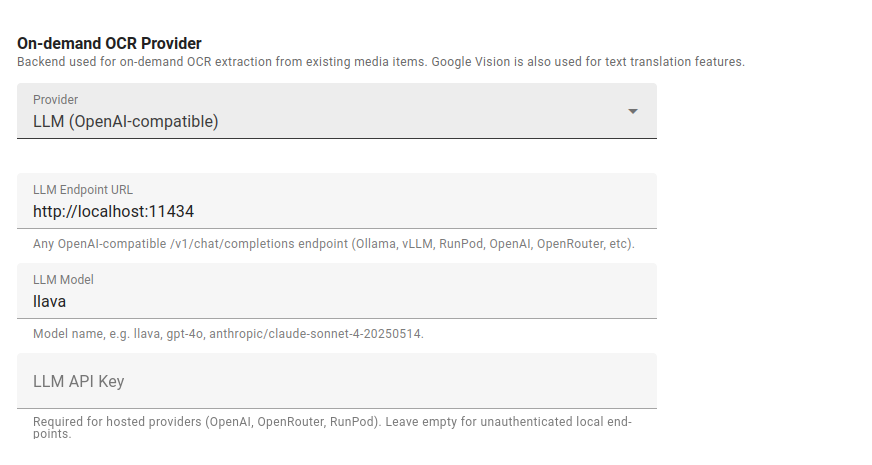
For human rights work, this is the whole point. An organization in Damascus, Mogadishu, or Caracas can run the entire pipeline on a single box in their own office, with no cloud bill, no foreign government with subpoena power over their data, and no vendor that can cut them off. Teams that prefer a hosted backend can plug in whichever model performs best on the documents they actually work with.
Open, private, yours. That is what running the AI yourself buys you.
Install Bayanat with one command
Standing up a Bayanat instance used to mean working through a long checklist: install PostgreSQL, set up PostGIS, install Redis, create users, configure Nginx, wire up the background worker, set environment variables. Easy to get wrong, hard to reproduce.
Version 4 ships a new command-line installer that does the whole thing in one step. On a fresh Ubuntu server:
curl -sL https://raw.githubusercontent.com/sjacorg/bayanat/main/bayanat | sudo bash -s install yourdomain.comDatabase, cache, web server, background worker — all configured and connected. The installer uses a symlink-based release layout under /opt/bayanat/, which means switching versions is instant and rolling back is just as fast. For organizations without a dedicated DevOps team, this lowers the barrier to running Bayanat considerably.
Upgrades that don't break things
Upgrading a Bayanat instance used to be a careful operation. You applied SQL migration files by hand, in the right order, and if you missed one your deployment would break in ways that weren't always obvious right away.
Version 4 fixes this. Upgrades are now a single command that knows what has already been applied and skips it, so running it twice is safe. There is also a new diagnostic command that checks whether your installation is healthy — database, background worker, storage, configuration — and tells you what is wrong before something else does. For teams running Bayanat in Docker, migrations now run automatically when the container starts.
The practical effect: upgrading from v3 to v4, and every version after, is a routine operation rather than a project.
Security hardening
Version 4 adds a set of improvements that should be invisible to end users but matter to the people running the platform.
The most significant is a browser-level defense (Content Security Policy) that blocks a common class of attacks where malicious code is injected into a page. Version 3 did not have this. Error messages have been cleaned up so that internal details no longer leak out when something goes wrong. Administrators now have finer control over who can see uploaded media. The code that handles the administrative interface has been broken into smaller, more isolated pieces, which makes security review much easier.
On the process side, every proposed change to Bayanat is now checked by four separate automated security scanners and over 770 automated tests before it can be merged. The project also now has a published security policy explaining how to report vulnerabilities, and the threat model — the document describing what Bayanat is defending against and how — has been updated.
Smaller things that add up
Chips-based advanced text search. An actor map visualization built on Leaflet. PDF thumbnails on media cards. A new documentation site at docs.bayanat.org replacing the old wiki. Redesigned labels management with hierarchy constraints. Dark mode now syncs across the rich-text editor. Drag-free coordinate entry on maps. Renamed fields where the old wording was confusing — "Last Address" is now "Place of Disappearance" on missing-persons profiles.
How to get it
Existing v3 installations can upgrade by running flask db upgrade. The full upgrade guide is at docs.bayanat.org/deployment/upgrading.
New installations can use the one-command installer. The full installation guide is at docs.bayanat.org/deployment/installation.
One note for operators with custom code: views.py was split into sub-modules, so anything that imported from enferno.admin.views directly will need its import paths updated. See the Breaking Changes section of the release notes.
The full release notes, including all 76 merged pull requests, are at github.com/sjacorg/bayanat/releases/tag/v4.0.0.
Thank you
Bayanat 4 represents six months and 76 pull requests of work since v3. Thanks to everyone who filed bugs, contributed code, reviewed changes, and shared what they needed the platform to do.
___________________________
For more information or to provide feedback, please contact SJAC at [email protected] and follow us on Facebook and Twitter. Subscribe to SJAC’s newsletter for updates on our work